Sales
Prep faster, de-risk deals, and reuse winning tactics, grounded in your CRM, meetings, and account context.
How do Sales teams use Digital Twin?
Digital Twin helps sales teams move faster on the work that eats their week: account research, meeting prep, deal triage, and drafting customer-facing responses. Instead of digging across CRM records, email threads, and call notes, reps ask in plain language and get answers grounded in connected data sources.
| Use case | Task to tackle |
|---|---|
| Account & meeting briefing | Synthesize opportunity history, stakeholders, risks, and talking points before customer calls |
| Ask a sales expert's twin | Transfer tactics, discount patterns, and competitive positioning without interrupting top performers |
| Deal risk & next-best-action | Flag stale or at-risk deals; prioritize RFPs, renewals, and negotiation moves |
| Prospect questions & RFPs | Answer product, pricing, security, and competitive questions with approved collateral |
Tutorial & Guides
1. Account Snapshot & Meeting Prep
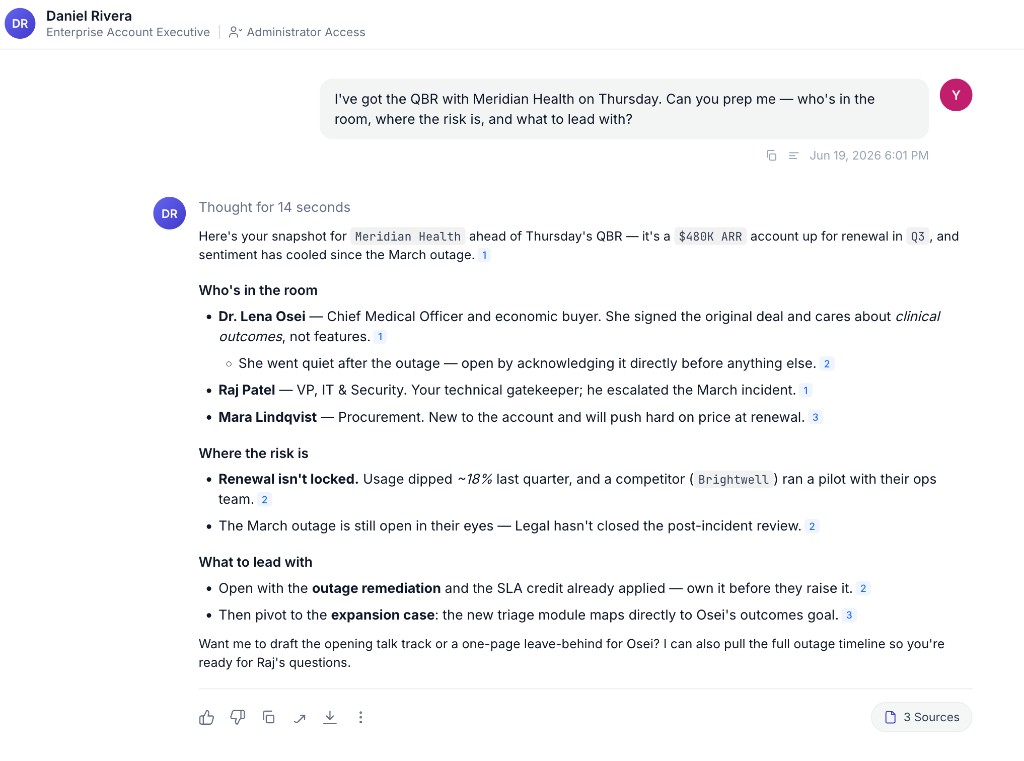
Create snapshots of key accounts using live data from your CRM, past emails, meeting transcripts, and calendar events. Digital Twin pulls together stakeholder context, recent activity, open items, and risks so you walk into every call prepared.
How teams put this to work
Build an account Expert Twin. For strategic accounts, an Account Expert Twin aggregates knowledge from everyone working the deal, so one question routes to the right context from the right person.
Prep in the moment. Ask in chat before any call and the Twin pulls CRM history, emails, and meeting context into a single brief, or ask right inside Slack without leaving the channel.
A pre-meeting brief can be set up as a scheduled Agent that runs before customer meetings and drops a one-page prep note in your inbox. See Creating Scheduled Tasks.
Example prompts:
What can you tell me about the opportunity at [customer name]?
Brief me for my meeting tomorrow with [contact name] at [customer name].
What are the latest account updates, deal status, and strategic initiatives for [customer name]?
2. Ask a Sales Expert's Twin
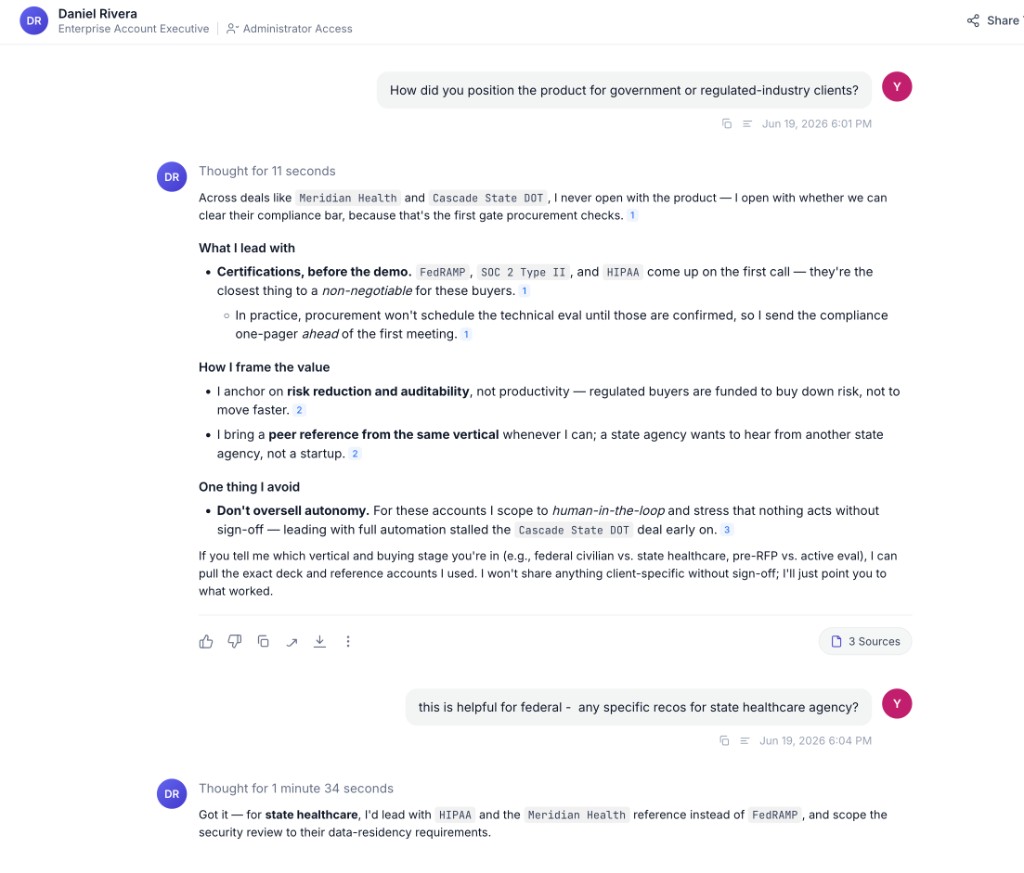
This is one of the highest-impact patterns on the platform. When a top performer shares their Twin, teammates get access to deal knowledge, sales tactics, competitive intelligence, and negotiation judgment, without scheduling another meeting.
The Twin answers from that person's actual deal history, emails, and captured rationale, not generic best practices.
How teams put this to work
Transfer hard-won knowledge. New reps query veteran Twins for tactics they'd otherwise learn only through shadowing, like "How did you open the conversation with procurement?". And when a senior rep transitions out, their Twin preserves the playbooks and judgment calls that never made it into a formal doc.
Build an Expert Twin for repeatable workflows. For workflows like enterprise RFPs or contract redlines, teams build a dedicated Expert Twin backed by their best sellers plus reference documents, so the whole org gets consistent, approved answers.
This use case only works when experts are willing to share. Full Persona access gives teammates the broadest view of a colleague's knowledge; custom personas scope access to a specific project or domain if full access is too broad.
Example prompts:
What discounts or incentives did you use in past enterprise deals?
How did you approach follow-ups for high-value leads that went cold?
How did you position the product for government or regulated-industry clients?
Which competitors did you run into most often, and how did you handle them?
3. Deal Risk Digest & Negotiation
Turn CRM and relationship signals into prioritized actions for stale or risky deals. Digital Twin helps with negotiation strategy, contract review focus areas, RFP prioritization, and renewal or expansion plays.
How teams put this to work
Prep for negotiations. Role-play with your Twin before a tough call, or upload a contract and ask for clause-level risk analysis grounded in the organization's past deals and playbooks.
Capture what works. After a complex negotiation closes, record the rationale in Train Now (discount thresholds, concession patterns, escalation triggers) so your Twin and teammates with access can reuse it on the next deal.
A weekly deal risk digest is one of the most common scheduled Agents sales teams set up: it pulls open opportunities with no recent activity, checks each account for risk signals, and messages reps a ranked list every Monday. See Creating Scheduled Tasks.
Example prompts:
Which deals have been stuck in the same stage for more than 30 days?
What Request for Proposals should I focus on this year?
What are the highest risk clauses in this contract and why?
What renewals, timelines, and risks matter in the next 90 days for [customer name]?
4. Prospect Question Handling / RFP
Answer prospect questions and RFPs with fresh, expert insights on products, competitors, and security, without starting from a blank page every time.
How teams put this to work
Ground answers in approved material. Upload a gold-standard RFP response, pricing sheet, or competitor positioning doc to your Library once, and your Twin grounds future drafts in that reference material instead of reinventing language every time.
Build an Expert Twin for org-wide consistency. Teams build an RFP or contract Expert Twin backed by legal, product, and sales contributors, so reps get approved answers without routing every question through a review chain.
Example prompts:
How do we handle data residency requirements for enterprise customers?
What is our positioning against [competitor] for mid-market accounts?
Draft a response to this security questionnaire section using our approved language.
Step-by-step guides for these workflows are on the way.