Sharing Your Twin
Control what your Digital Twin shares and with whom — using personas to give different people different levels of access to your knowledge.
Overview
Sharing a Digital Twin isn't all-or-nothing. Viven's Persona Based Access model lets you define distinct "personas" — each one a different slice of your knowledge — and share each persona with a specific audience. A manager might get full access, a project partner gets a focused view of just that project, and colleagues by default see only what they already have access to.
Your existing privacy rules apply across all personas. Content marked private — by you or by your organization — is never accessible through any persona, regardless of who is asking.
Your Two Default Personas
Every Digital Twin comes with two personas out of the box. No setup required.
| Persona | Who it's for | What it shares |
|---|---|---|
| Full Persona (previously Privileged Access) | People you explicitly grant it to | Everything you can access across your work, except content restricted by privacy rules |
| Standard Persona (previously Shareable Persona) | Co-workers by default | Content the requester already has access to, plus anything you've shared org-wide — excluding anything restricted by privacy rules |
Standard Persona may not be enabled for all accounts. Contact your Viven rep if you're unsure whether it's active for your organization.
How Standard Persona works
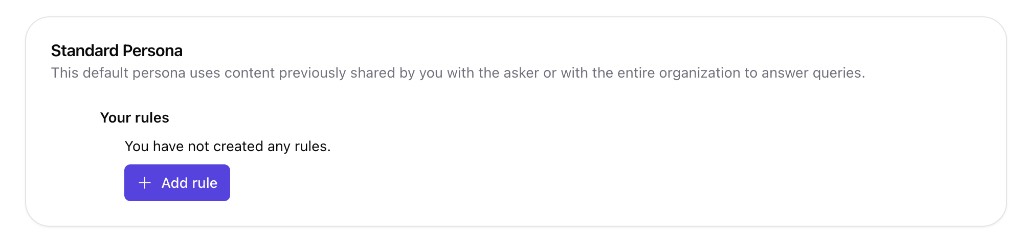
Standard Persona uses content you have already shared with the asker or with the entire organization to answer queries. Your Twin will not:
- Reference private or restricted artifacts
- Reveal summaries or metadata from sources the requester can't access
- Confirm whether restricted content even exists
If a question requires information outside that scope, the Twin will say it doesn't have permission to answer.
You can optionally add persona-specific rules under Your rules to further shape what Standard Persona may include or exclude. Select + Add rule to define them; if you have not created any rules, Standard Persona relies on your default sharing behavior only.
How Full Persona works
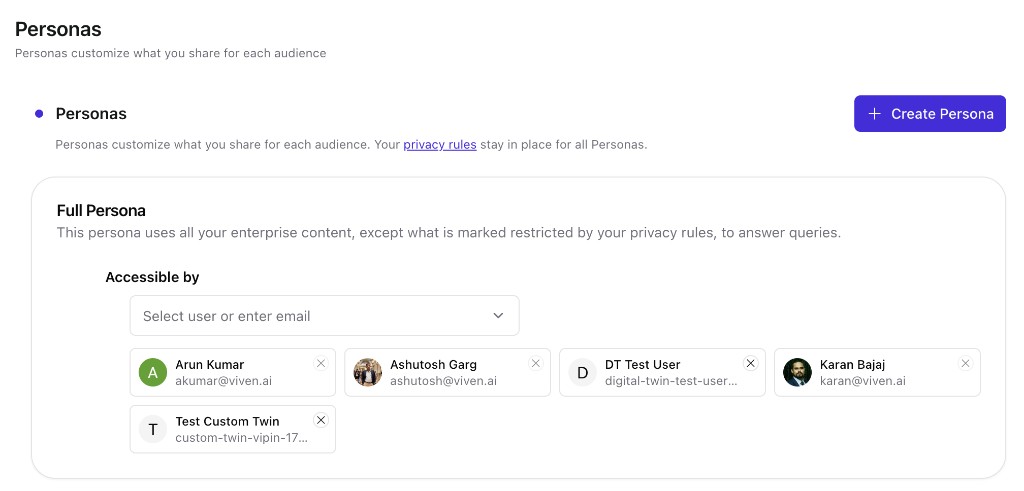
Full Persona uses all your enterprise content to answer queries, except what is marked restricted by your privacy rules. This is designed to feel like asking you directly, while still respecting both user-level and org-level privacy settings.
Who gets Full Persona access depends on your organization's settings. You can also explicitly grant or revoke access for specific people from the Personas page (see Managing Personas below).
Custom Personas
Beyond the two defaults, you can create Custom Personas — personas scoped to a specific project, topic, or curated set of content. This gives you precise control over what a particular group of people can ask your Twin about.
When to use a Custom Persona:
- A project team needs context on a specific initiative, but not everything else
- A partner or contractor needs focused access without broader visibility
- A cross-functional collaborator should see only the relevant domain
When someone queries a Custom Persona, the Twin strictly stays within that boundary — it ignores unrelated information even if it exists elsewhere in your knowledge base.
With a Custom Persona, someone may be able to get responses based on artifacts they don't have direct access to — depending on what you've included in the persona scope. Be deliberate about what you add.
Managing Personas
Open Ask → Privacy → Personas from your Digital Twin. Personas customize what you share for each audience; your privacy rules stay in place for all personas.
On this page you can review your default personas, grant Full Persona access under Accessible by (search for a user or enter an email, then remove anyone with the × on their card), and create additional personas with + Create Persona.
Creating a Custom Persona
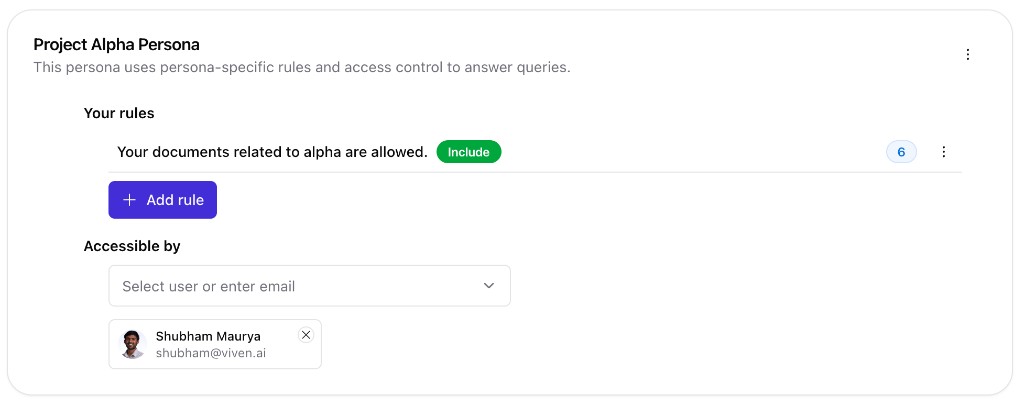
Click + Create Persona, name the persona, and describe what it should cover. Custom personas use persona-specific rules and access control to answer queries.
Under Your rules, add Include or Exclude rules to scope which content belongs in this persona (for example, documents related to a specific project). Under Accessible by, add the colleagues who should be able to query this persona.
Frequently Asked Questions
Yes — you can create as many Custom Personas as you need beyond the two defaults.
When multiple personas are available to answer a question, the Twin looks across all documents available across all those personas. If someone has access to both Full Persona and a Custom Persona, the response will effectively reflect Full Persona — since it already houses everything.
- If two people both have Full Persona access: no, they'll get the same answer.
- If two people both have Standard Persona access: yes, likely different answers — because what's "shared" differs per person.
No. Content restricted by privacy rules — whether set by you or by your organization — is never accessible through any persona.
Personas let you share different scopes for different audiences without making it an all-or-nothing decision. A project partner needs project context, not your entire knowledge base. Custom Personas make that distinction clean and explicit.