Operations
Track delivery health, automate status reporting, and keep operational knowledge accessible, without living in spreadsheets.
How do Operations teams use Digital Twin?
Operations and program management teams use Digital Twin to monitor execution, surface blockers, and produce recurring status artifacts. Whether you run delivery for an IT services organization or program-manage cross-functional initiatives, Digital Twin connects project boards, meeting notes, and team context into actionable summaries, grounded in your connected data sources.
| Use case | Task to tackle |
|---|---|
| Delivery ops & program health | Track execution, risks, dependencies, SLAs, and recurring delivery issues |
| Weekly status & RAID reporting | Automate project status drafts from board data, meeting notes, and standup summaries |
| Daily action pulse & escalations | Surface blockers, dependencies, and tomorrow's priorities on a recurring cadence |
| SOP & operations knowledge governance | Standardize SOPs, training materials, handoff docs, and governance workflows |
| VOC & account-level reporting | Produce voice-of-customer and detailed account reports on a schedule |
Tutorial & Guides
1. Delivery Ops & Program Health Twins
Track the signals your team cares about: slippage, dependencies, escalations, and operational commitments.
How teams put this to work
Build a custom Expert Twin. A Delivery Ops or Program Health Expert Twin aggregates project boards, meeting notes, and team context so status lives in one place.
Let the team self-serve. Share the Twin so anyone can pull current blockers, risks, and progress without waiting on a status meeting.
A daily action pulse, blockers-and-dependencies check, and end-of-day progress summary are common scheduled Agents. See Creating Scheduled Tasks.
Example prompts:
Generate my daily delivery status for [program name].
What blockers are putting commitments at risk this week?
Summarize today's escalations and recommended next steps.
2. Weekly Status & RAID Reporting
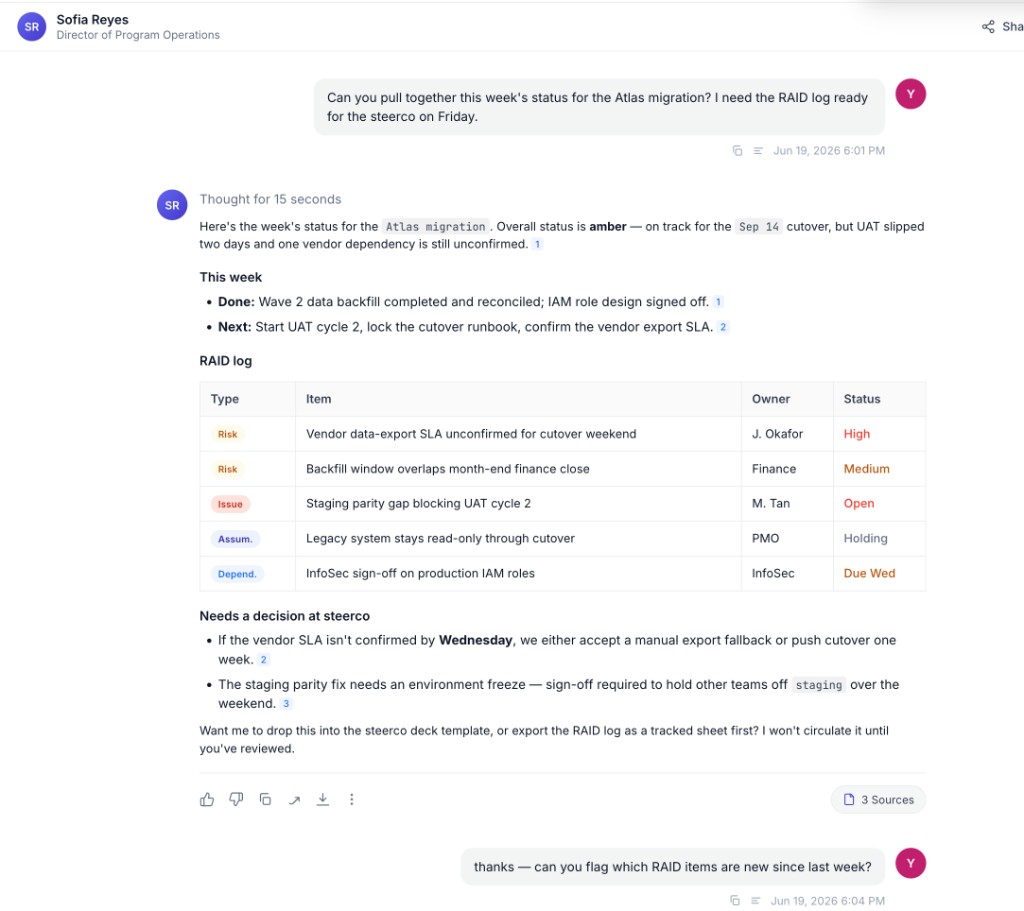
Assemble status from project boards, meeting notes, and standups into a RAID-aware report ready for PM review.
How teams put this to work
Draft from connected sources. Ask the Twin to pull milestone status, overdue items, and blockers from your board and meeting notes into a structured report.
Standardize the format. Capture your reporting template in Train Now so every draft follows the same RAID structure your stakeholders expect.
A Monday-morning status draft is a strong scheduled Agent: it queries the board and meeting notes, drafts a RAID report, and sends it for review. See Creating Scheduled Tasks.
Example prompts:
Draft a weekly RAID report for [program name] based on this week's board status and meeting notes.
What milestones are overdue, and what's blocking each one?
3. Daily Action Pulse & Escalations
Start each day with a prioritized view of what needs attention, without manually scanning channels and boards.
How teams put this to work
Surface what matters first. Ask the Twin to scan your day's items and rank them by urgency and business impact.
Spot decisions waiting on you. Have the Twin flag where progress is stalled on your input and suggest next steps.
A morning priority brief is one of the most common scheduled Agents. See Creating Scheduled Tasks.
Example prompts:
What are the critical items I need to address today for [program name]?
Summarize key actions from last week and prioritize them by urgency.
Highlight areas where decisions are waiting on me and suggest next steps.
4. SOP & Operations Knowledge Governance
Turn scattered process knowledge into searchable, governed documentation: SOP repositories, training archives, and handoff playbooks.
How teams put this to work
Make process knowledge askable. Connect your SOP and training sources so anyone can ask how a process works and get a current, grounded answer.
Capture the exceptions. Use Train Now to record the judgment behind process exceptions, the cases that don't fit the standard SOP but every experienced operator knows how to handle.
Example prompts:
What is the current SOP for [process name]?
Can we make changes to SOPs without customer approval in this scenario?
What should be included in the step-by-step section for [procedure name]?
5. VOC & Account-Level Reporting
For IT services and delivery organizations, produce structured voice-of-customer reports, account-level summaries, and executive-ready outputs.
How teams put this to work
Compute and synthesize in one pass. Ask the Twin to calculate satisfaction metrics and segment scores, then summarize the qualitative themes behind them.
Reuse the structure. Standardize your VOC and RAID formats so each cycle's report is comparable to the last.
VOC summaries, RAID tables, and weekly status packs are well suited to scheduled Agents that output to your preferred format and send on a cadence. See Creating Scheduled Tasks.
Example prompts:
Generate a VOC summary for [account name]: satisfaction metrics, segment scores, and qualitative themes.
Produce a RAID table for [program name] with current risks, assumptions, issues, and dependencies.
Calculate key delivery indicators for this cycle and compare with the prior period.
Step-by-step guides for these workflows are on the way.