Training Your Twin
Capture what's in your head — judgment, tradeoffs, playbooks — so your Twin can answer like you would, even when you're not around.
Why Train Your Twin?
Connected Data Sources bring in everything that's already written down — emails, docs, meetings, messages. Training Your Twin captures the rest: the tacit knowledge that lives in your head and never quite makes it into a document.
The reasoning behind a pricing call. The way you triage incidents. The unwritten rules of how you handle a difficult customer. The thing you'd say if a teammate asked you for the third time this month.
Training turns that into structured, retrievable knowledge your Twin can ground answers in — so the answers your Twin gives match the answers you'd give.
To get started: Open My Twin → Train Now.
The Four Ways to Capture Knowledge
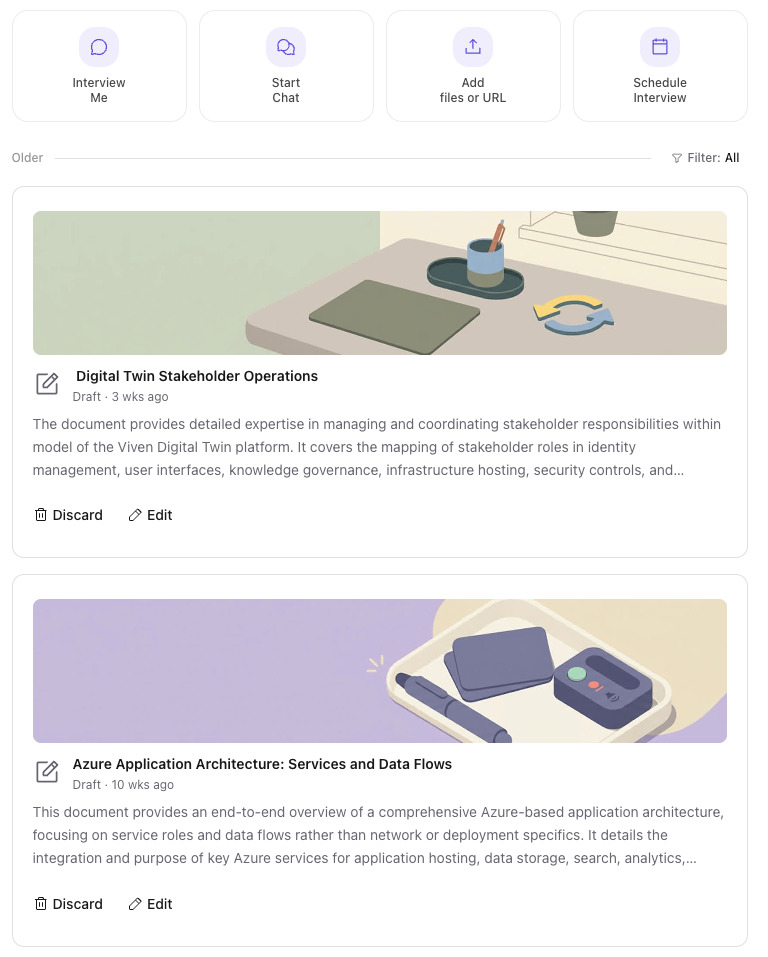
At the top of Train Now, four quick actions start a new capture session:
| Mode | What it does | Best for |
|---|---|---|
| Interview Me | A guided voice or chat interview. The AI asks targeted, follow-up-driven questions to probe the why behind your decisions — not just the what. | Complex reasoning that's faster to talk through than type. Pricing playbooks, escalation rationale, framework decisions. |
| Start Chat | Type your way through training. Skip straight to the point without being guided. | When you already know exactly what you want to add — a specific decision, project context, or a repeated answer. |
| Add files or URL | Drop documents, notes, or URLs you've already written down somewhere. The Twin extracts and indexes the content as training material. | Meeting notes, decision memos, internal write-ups not yet organized into anything formal. |
| Schedule Interview | Same as Interview Me, but books a calendar invite with a direct session link for later. | When you want to carve out time rather than train in the middle of something. |
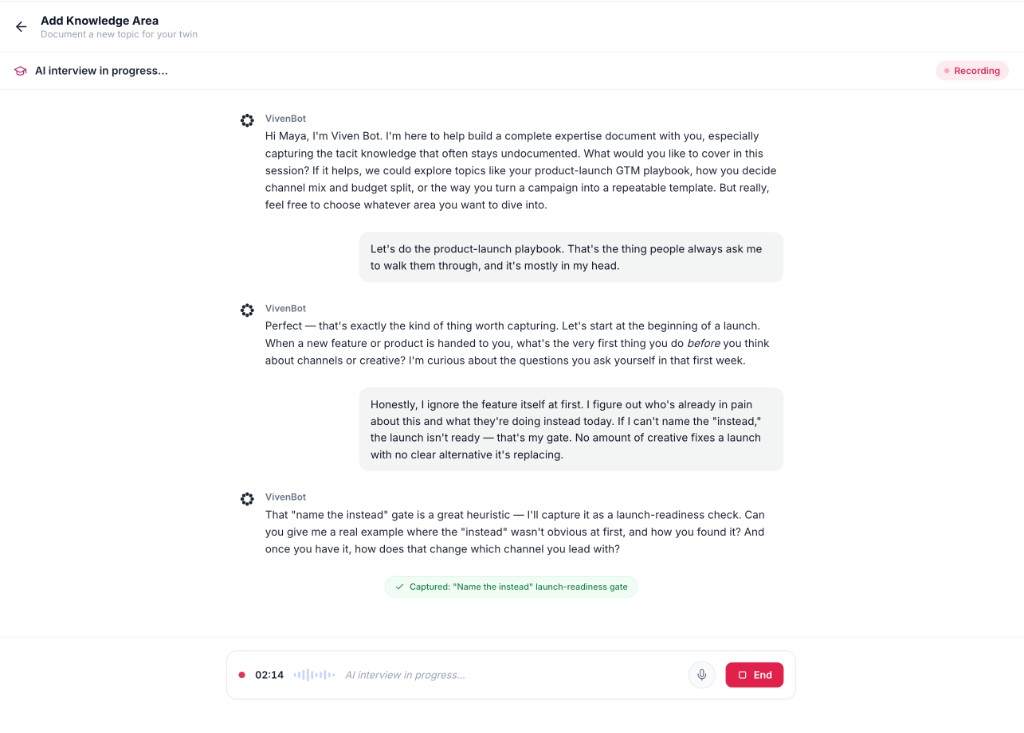
Interview Me runs a guided conversation: the AI asks follow-up questions, captures judgment and exceptions as you talk, and turns the session into a draft artifact you can publish.
Every mode produces a draft artifact that you review and refine before publishing. Below the action row, scroll through Older drafts (use Filter: All to narrow the list). Each draft shows its title, status, summary, and Edit or Discard actions.
Artifacts: The Output of Training
Everything you train produces an artifact — a structured knowledge output that lives in your Twin's library and surfaces when relevant questions come up.
Types
| Type | What it's for |
|---|---|
| Playbooks | Step-by-step execution guides for repeat workflows. |
| FAQs | Reusable answers to questions that keep coming up. |
| Documents | Longer-form structured knowledge that doesn't fit a playbook or FAQ shape. |
Where they live in Train Now
| Feed section | What's in it |
|---|---|
| Recommended | Knowledge gaps the Twin has detected and is nudging you to fill. |
| Drafts | Captured but not yet reviewed or published. |
| Published | Live and retrievable by people who have access. |
| Conversations | Questions people have asked your Twin — with its responses — where you can correct or enrich. |
Open any Draft to Edit and publish when ready, or Discard to remove it. You can edit, refine, or discard published artifacts as well. Unpublishing a published artifact removes it from retrieval until you republish.
How Recommendations surface
Background agents continuously analyze your activity across connected sources — what you've been writing about, what comes up in meetings, what people are asking your Twin. When the system spots a topic you're clearly working on but haven't explicitly captured, it surfaces a recommendation in the Train Now feed.
You've been authoring a lot of docs and chatting about a release process but never formally documented your approach — the Twin nudges you to capture it. Same logic applies when your Twin keeps getting asked about pricing edge cases and struggling: that becomes a recommendation to capture pricing rationale.
What to Train Your Twin On
The patterns that consistently produce the most value:
- Decision rationale + tradeoffs — the why behind key calls you've made.
- Playbooks for repeat workflows — your actual sequence of steps for an end-of-quarter close, a customer escalation, an incident review.
- FAQs for questions you keep getting — turn the third repeat into a reusable answer.
- Failure patterns — what goes wrong, how you spot it early, how you recover.
- Heuristics and frameworks — your "how I decide" patterns. What would change your mind. What you weight more heavily.
- Boundary-setting rules — how the Twin should handle tricky asks, escalate, or stay quiet.
- Onboarding context — what someone new to your role keeps needing to be told.
Sharing and Access
By default, artifacts you publish are accessible to anyone with full persona access to your Twin — the same access pattern as the rest of your knowledge.
| Sharing level | Who can access |
|---|---|
| Private (only you) | You alone. Useful for drafting before you're ready to share. |
| Restricted | Full persona users only. Not visible to standard persona users or your org broadly. |
| Specific people | Only the individuals you explicitly invite. |
| Anyone at your org | Everyone in your organization. |
You can change the sharing level on any artifact at any time. Unpublishing pulls it out of retrieval entirely until you republish.
The Feedback Loop
Training doesn't stop at publishing. Every conversation your Twin has is another chance to improve.
When someone asks your Twin a question, you can respond to the answer in three ways:
| Action | What it does |
|---|---|
| Looks good | Confirms the answer was right. Reinforces the pattern for future questions. |
| Edit | Correct or refine the response. The corrected version becomes the new ground truth. |
| Chime | Add a comment or extra context without rewriting the whole answer. |
These signals show up in the Conversations section of Train Now, where you can review and act on questions your Twin has already handled.
The result is a continuous loop: capture → publish → retrieve → correct → improve.
A Practical Way to Start
Most people get the most value by starting small and letting the system surface what to do next.
- Start with one Interview on the topic you spend the most time explaining to other people.
- Let Recommendations build up over a week or two as the Twin watches your work.
- Respond to your first few Conversations with Edit or Chime so your Twin learns your real voice on questions you actually get.
- Add Playbooks for the workflows you find yourself repeating.
The Twin gets noticeably more useful — to you and your teammates — within the first couple of sessions. After that, it's incremental.
Related Settings
- Privacy Rules — block specific topics, sources, or content from ever being surfaced.
- Personas — control how much of your knowledge the Twin shares based on who's asking.
- Analytics — see how your Twin is being used.
- Audit Logs — chronological record of training, edits, and access events.
- Apps — connected data sources and integrations.