Creating Custom Experts
Build a Twin that's tailored to a workflow, account, or team — pulling the right context from the right people for the right question.
What's an Expert Twin?
An Expert Twin is a custom Twin built for a specific workflow, account, project, or domain. It's an amalgamation of knowledge from one or more contributors plus connected sources, configured to behave in a particular way.
Where your own Twin represents you, an Expert Twin represents a job to be done. Common shapes:
- Account or customer Expert — for a specific client. The 3 people working the account each contribute their Twin's knowledge; the Expert pulls the right context from the right person for any question about the account.
- Workflow Expert — for a repeat process like RFP responses, contract redlines, or incident retros. Built around the playbook plus people who know the playbook well.
- Domain Expert — for an area like SOPs, security questionnaires, or governance frameworks. Often built from a single contributor plus reference documents.
An Expert can be backed by one person, several people, or just sources — whatever fits the workflow.
Gallery vs. My Experts
Open Experts from the left nav to browse and interact with Experts. Use Search Expert by name... to find one quickly.
Two tabs organize what you see:
- Gallery — every Expert available to you. Templates appear first (pre-built starting points for common workflows), followed by All Experts published in your org. Each card shows a short description and a Chat action.
- My Experts — Experts you've created.
Click + Create Expert in the top-right to build from scratch, or open a template tile to start from a pre-built configuration.
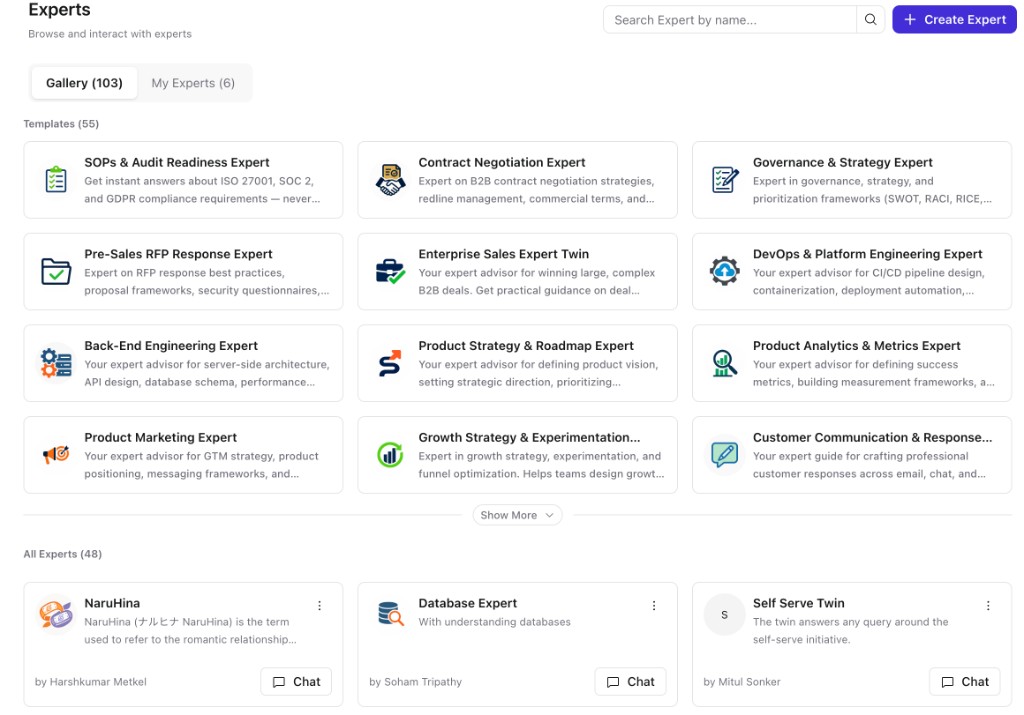
Two Ways to Create an Expert
Start from a template
Templates are pre-built Expert configurations for common workflows — Pre-Sales RFP Response, Contract Negotiation, SOPs & Audit Readiness, and around a hundred others. Each template comes with a description, prompt instructions, conversation starters, and (in many cases) a starter knowledge document.
To use one:
- On the Experts page, click a template tile.
- Edit the Description if you want, and add anything specific to your context in Personalise (optional).
- Click Review & Build. The system personalizes the prompt instructions and configuration based on your input, and drops you into the Expert editor with everything pre-filled.
- Make any final tweaks across the three steps and Publish.
Build from scratch
Click Create Expert in the top-right of the Experts page. You go straight into the three-step editor with empty fields.
The Three Steps
Every Expert — template-based or from scratch — is configured through the same three-step flow:
- Knowledge Sources Setup — what the Expert knows. Invite contributors' Twins, connect sources, upload files.
- Behavioral Cues — how the Expert responds. Prompt instructions and conversation starters.
- Access & Sharing — who can use it, who admins it, and where it shows up (web, Slack).
Use Save Draft to keep working without making changes live, and Publish when you're ready for the Expert to be active.
Roles on an Expert
Three roles control what someone can do with an Expert:
| Role | Can do |
|---|---|
| Admin (creator + anyone they promote) | Edit configuration, invite contributors, manage access, view audit logs. |
| Contributor | Add or remove knowledge sources from their side. Cannot edit prompt instructions. Must accept the invite and choose a persona level before contributing. |
| User (read-only) | Chat with the Expert. Cannot manage configuration. |
How Contribution Actually Works
When you invite someone's Twin to contribute knowledge, they get notified and have to accept. They can revoke contribution later from their own settings.
Once they're contributing, the Expert can pull from their knowledge — but what actually surfaces in any given answer depends on the asker's permissions, not the contributor's.
Persona access is enforced from the asker's side
Every contributor has a persona setting that defines who can see what from their Twin's knowledge — Full persona and Standard persona are the two main levels. When someone chats with the Expert, the Expert checks each contributor's persona for that asker and grounds answers only in documents the asker is entitled to see.
In practice:
- If the asker has full persona access to a contributor, the Expert can surface documents from that contributor's Twin (subject to that Twin's privacy rules).
- If the asker has standard persona access, the Expert can only surface documents the asker already has access to via that contributor.
The Expert respects the asker's document universe across every contributor. No one ever sees anything they aren't entitled to see, even when the Expert is combining knowledge from multiple people.
This is what makes the "amalgamation" work safely: the same Expert gives different people different answers, scoped to what each asker is allowed to know.
Where Experts Live
Experts are usable from two surfaces today:
- The web app — anyone with access can chat with the Expert from the Experts page.
- Slack — on the Access & Sharing step, link the Expert to one or more Slack channels. Once linked, the Expert can respond in those channels in the flow of work.
More surfaces are on the way. See Access & Sharing for the full details.
When to Build an Expert
Build an Expert when:
- You repeat a workflow often enough that the prompt + sources are worth saving.
- A team or account needs a shared place to ask "what's the latest on X" without pinging individuals.
- You want to combine multiple people's context into a single queryable entity — without each person having to manually share their work.
Skip it when a single question to your own Twin would do the job, or when the workflow is one-off.
Frequently Asked Questions
Your Twin represents you and your knowledge. An Expert Twin is a custom Twin built for a specific workflow, account, or domain — it can combine knowledge from multiple people's Twins plus other sources.
No. Any user can create their own Expert Twin from the Experts page.
Their knowledge stops flowing into the Expert. Other contributors and connected sources are unaffected. The Expert continues to work with what it still has access to.
Not necessarily. The Expert respects each asker's permissions across every contributor, so the same question can return different answers depending on what the asker is entitled to see.
Yes. Once you click Review & Build, the Expert is yours — every field is editable across the three steps.
A Library file is a single piece of reference content. An Expert is a configured Twin with its own knowledge sources, instructions, and access list. You can attach a Library file to a chat with an Expert if you want, but the two surfaces solve different jobs.