Behavioral Cues
Shape how your Expert responds — what its role is, how it should answer, and what to suggest first.
The Behaviour Step
This is the second step in the Expert creation flow (Behaviour in the stepper). It controls how the Expert talks, what it focuses on, and what it suggests when someone opens a fresh chat.
Two sections on this page:
- Prompt instructions — the Expert's core direction. Role, expertise, scope, response style.
- Conversation Starter — up to four suggested questions shown on an empty chat.
Use Previous to return to Knowledge, or Next: Access & Sharing when you're ready to configure who can use the Expert.
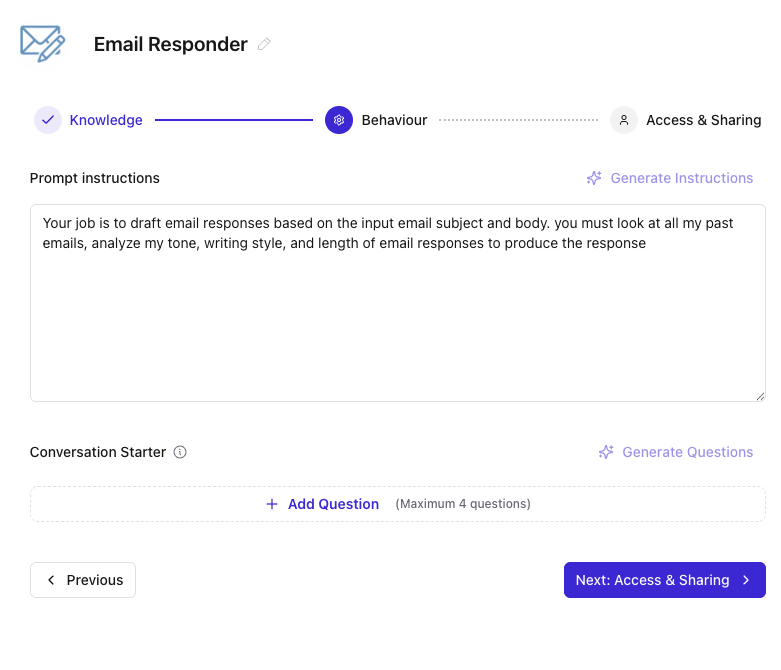
Prompt Instructions
This is the Expert's playbook. Write it like a brief for a new team member taking on the role: who they are, what they cover, how they should answer.
A typical structure that works:
- Role, Expertise, and Purpose — what the Expert is, what it owns, what it doesn't.
- Response style — tone, length, format (bullets vs prose), citations.
- Scope and boundaries — what's in scope, what to redirect.
- Edge cases — how to handle missing context, ambiguous questions, sensitive topics.
Markdown structure (headings, bullets) is encouraged for readability. Keep instructions specific over generic — "respond with a bulleted action list followed by owners" beats "be concise and helpful."
Generate Instructions
Click Generate Instructions to auto-draft a starting set. The generation is based on the Expert's Description (from the Knowledge step) and its configured sources, so a sharper description leads to better generated instructions.
You can edit anything after generation. Treat the output as a starting draft, not a final answer.
Conversation Starter
These are the suggested questions a user sees when they open a fresh chat with the Expert. Up to four, and the UI enforces that cap.
Good conversation starters are:
- Specific to the Expert's job — for an account Expert, "What are the open issues for [account]?" not "How can I help?"
- Things people actually ask — pull from real questions you've seen come up.
- Action-oriented — "Draft a follow-up email for [scenario]" works better than "Tell me about emails."
Click + Add Question to add a starter (maximum four). Remove any row with the × when you no longer need it.
Generate Questions
Click Generate Questions to auto-draft starter questions. Like instruction generation, this uses the Description and configured sources as the basis.