Customer Success
Keep every account on track: synthesize health signals, draft executive-ready updates, and get expert answers without chasing colleagues.
How do Customer Success teams use Digital Twin?
Customer Success teams use Digital Twin to assemble account context from CRM, product usage, support tickets, emails, and meetings, then turn that context into briefings, risk flags, and customer-ready communication. CSMs spend less time on data scavenger hunts and more time on relationship strategy. Answers are grounded in your connected data sources.
| Use case | Task to tackle |
|---|---|
| Account health & executive updates | Synthesize customer status, recent developments, risks, and leadership-ready summaries |
| QBR & renewal preparation | Assemble account dossiers, QBR narratives, and renewal briefs from scattered sources |
| Ask a customer-facing expert's twin | Get compliance, roadmap, or account-history answers without interrupting the subject-matter expert |
| Proactive risk & expansion detection | Flag churn signals, usage drops, and expansion opportunities with supporting context |
Tutorial & Guides
1. Account Health & Executive Updates
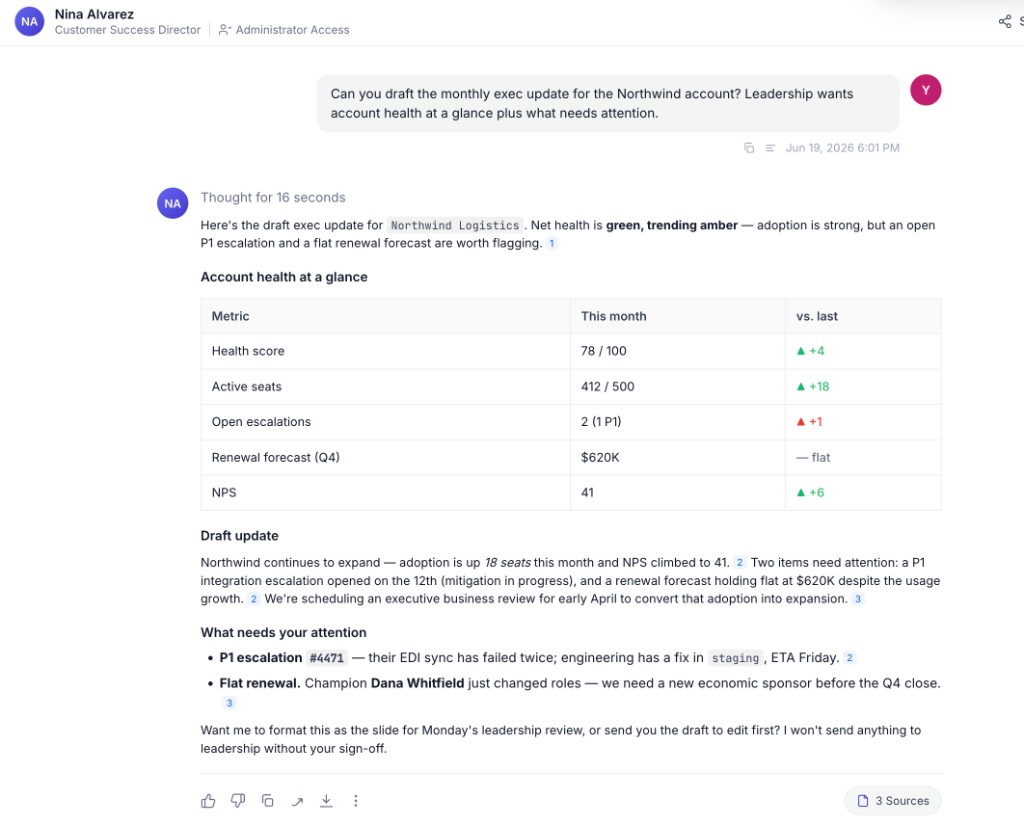
Pull together customer status, recent developments, open risks, and follow-ups into a single briefing, then draft customer-ready or executive-ready communication.
How teams put this to work
Brief on demand. Ask for an account snapshot before any call and the Twin pulls CRM history, usage, support themes, and recent meetings into one view.
Draft in your voice. Capture how you write client updates in Train Now so drafts sound like you, whether it's a quick check-in or a leadership-ready summary.
A weekly book-of-business health summary is a natural scheduled Agent: it flags accounts that need attention and lands in your inbox every Monday. See Creating Scheduled Tasks.
Example prompts:
Can you share an update on [customer name], especially recent developments?
Could you draft a CEO update email on [customer name]?
What's the current health and key risks for the [customer name] account?
What follow-ups am I missing for [customer name] this week?
2. QBR & Renewal Preparation
Bring together CRM data, usage trends, support history, and meeting notes so you start every QBR or renewal conversation with a draft, not a blank slide deck.
How teams put this to work
Assemble the dossier. Ask the Twin to compile usage trends, open issues, and renewal timeline into a single brief you can refine instead of build from scratch.
Build an account Expert Twin. For top accounts, an Account Expert Twin aggregates context from everyone touching the account, so QBR prep pulls from the whole team, not just your inbox.
Example prompts:
Prepare a QBR brief for [customer name]: usage trends, open issues, and renewal timeline.
Summarize account health for this week across my book of business.
Draft a client-ready status update for [customer name] based on our last 30 days of activity.
3. Ask a Customer-Facing Expert's Twin
When a question requires deep product, compliance, or account-history knowledge, query the colleague's Twin instead of scheduling another sync.
How teams put this to work
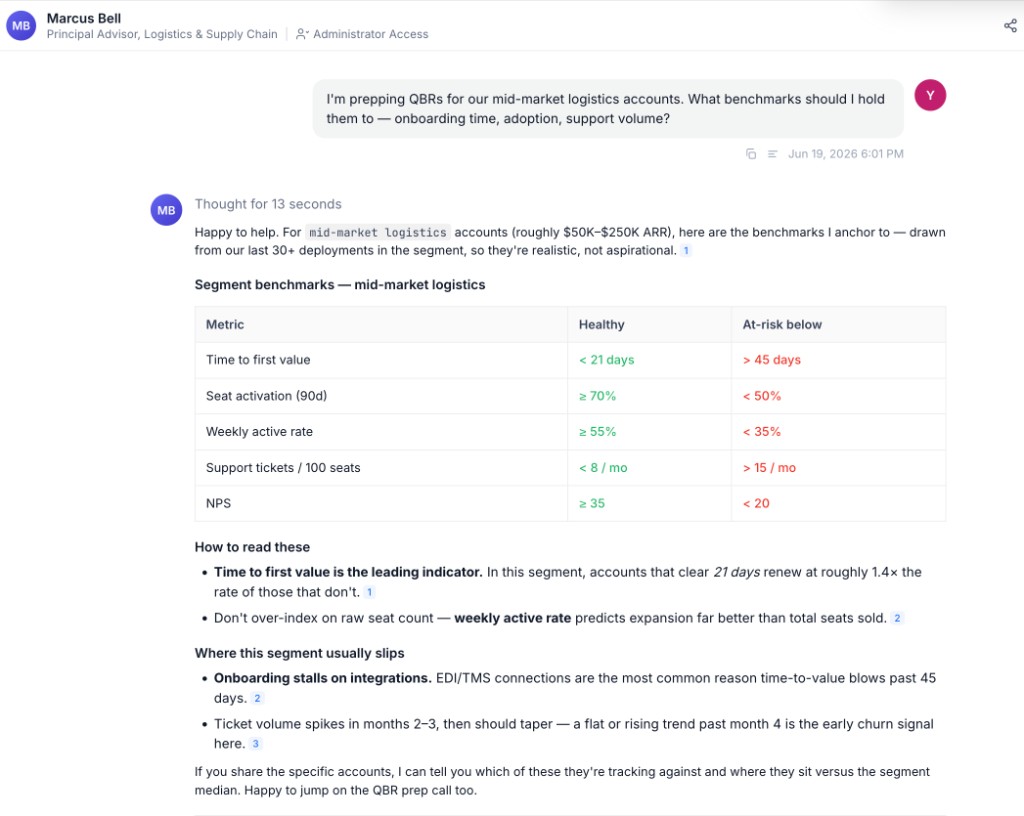
Get answers without the interrupt. Ask a colleague's Twin for compliance details, roadmap commitments, or account history and get a grounded answer in seconds, with no back-and-forth.
Preserve continuity. When a CSM transitions off an account, their Twin keeps the relationship context and prior commitments accessible to whoever picks it up.
Example prompts:
What can I share with a customer about our EU AI Act readiness?
What was your work with [customer name] last year?
Did we promise any roadmap features to [customer name]?
What action items came out of the [customer name] meeting?
4. Proactive Risk & Expansion Detection
Surface accounts that need attention before renewal, including usage drops, sentiment shifts, and unresolved support themes, with enough context to act immediately.
How teams put this to work
Scan across the book. Ask the Twin to rank accounts by health or flag usage anomalies so you spot risk early instead of at renewal.
Bring the context, not just the alert. Pair the flag with prior concerns and recent interactions so you know why an account is slipping before you reach out.
A weekly risk digest works well as a scheduled Agent: it flags health-score drops and usage anomalies, then messages you a ranked list. See Creating Scheduled Tasks.
Example prompts:
Which accounts have the lowest health scores this month?
Flag customers whose usage dropped more than 20% week-over-week.
What concerns has [customer name] raised in past interactions?
Step-by-step guides for these workflows are on the way.