Product
Turn customer signals, roadmap context, and launch history into decisions, grounded in everything your team already knows.
How do Product teams use Digital Twin?
Product teams use Digital Twin to synthesize customer feedback, support themes, and roadmap context across scattered sources. Instead of manually assembling inputs for a PRD or stakeholder update, PMs ask in plain language and get answers grounded in connected data sources: docs, meetings, and tickets.
| Use case | Task to tackle |
|---|---|
| Product & voice-of-customer signal pulse | Track customer feedback themes, roadmap risks, and release readiness on a recurring cadence |
| PRD & discovery support | Pull customer insights, feature learnings, and related roadmap items while writing specs |
| Stakeholder updates & tradeoff communication | Draft updates explaining roadmap decisions, risks, and prioritization rationale |
| Customer meeting prep & artifact search | Assemble interaction history and find supporting documents before customer calls |
Tutorial & Guides
1. Product & Voice-of-Customer Signal Pulse
Track the signals your team cares about: feedback themes, roadmap risks, release readiness, and post-release monitoring.
How teams put this to work
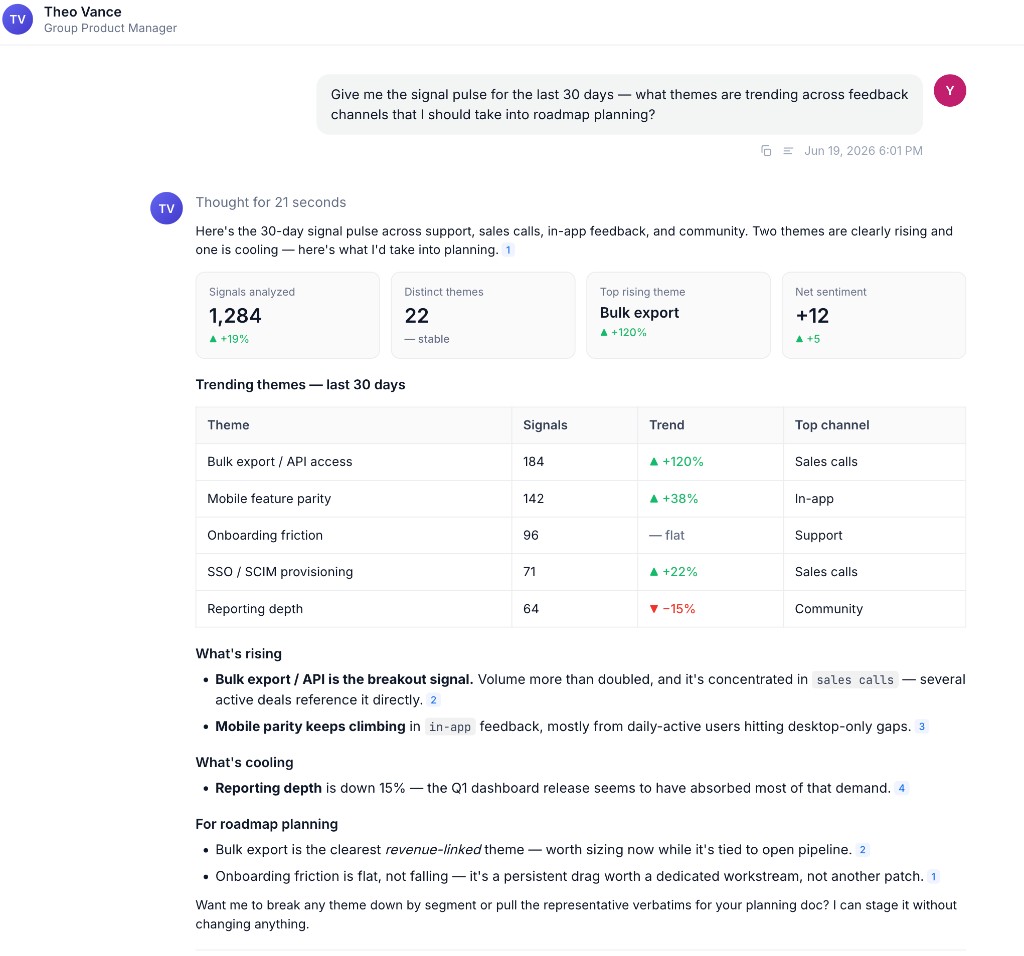
Build a Voice-of-Customer Twin. A Product or VOC Expert Twin aggregates feedback from support, sales calls, and meetings so themes surface across sources, not one inbox.
Turn signal into action. Ask the Twin to convert a feedback cluster into a problem statement or flag roadmap items that are quietly going at risk.
A weekly product signal pulse and a post-release monitor work well as scheduled Agents that summarize themes and flag risks on a cadence. See Creating Scheduled Tasks.
Example prompts:
Summarize top customer feedback themes from the last 30 days.
What roadmap items are at risk and why?
Turn this feedback cluster into a problem statement.
2. PRD & Discovery Support
Bring customer insights, past feature learnings, and related roadmap items into your spec-writing workflow.
How teams put this to work
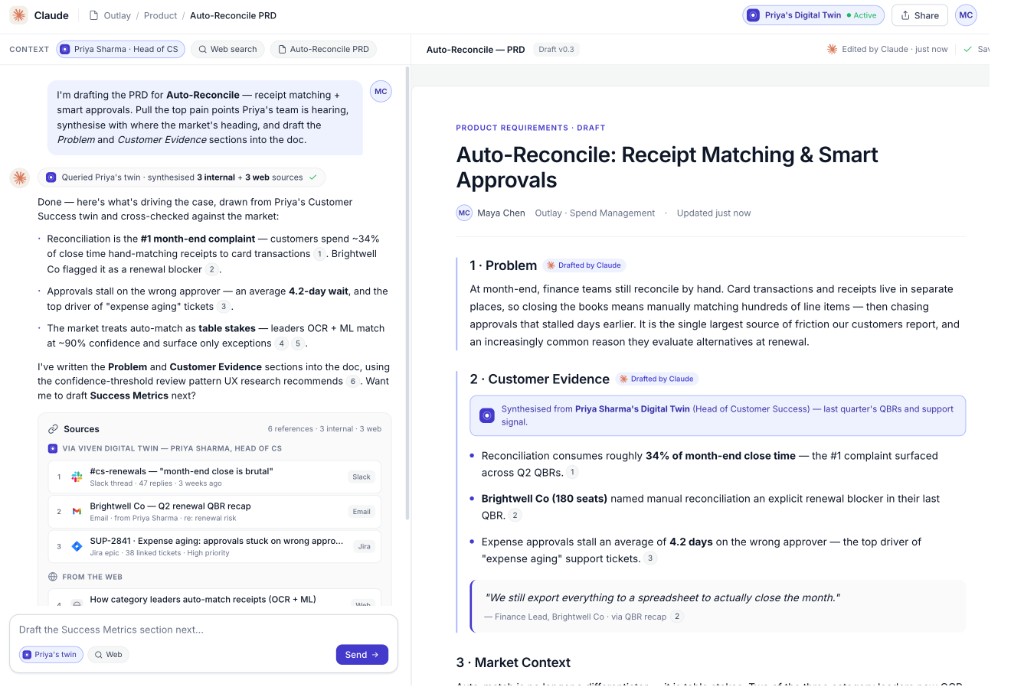
Pull context into the spec. While drafting, ask the Twin for relevant customer conversations, support tickets, and prior feature learnings so the PRD reflects what you already know.
Draft where you write. Use Digital Twin in Claude or your writing tool of choice so organizational context is embedded as you spec.
Example prompts:
I'm writing a PRD for [feature name]. What customer insights, support tickets, and prior learnings should I include?
What edge cases did we miss on the last similar launch?
What questions should I ask in discovery calls for [feature area] based on past customer conversations?
3. Stakeholder Updates & Tradeoff Communication
Draft leadership-ready updates that explain what shipped, what's at risk, and why certain tradeoffs were made.
How teams put this to work
Explain the tradeoffs. Ask the Twin to assemble release readiness, escalations, and dependencies into an update that frames the decision, not just the status.
Capture the rationale. After a major prioritization call, use Train Now to record why you chose one path so the reasoning is retrievable when the question resurfaces.
Example prompts:
Draft a stakeholder update explaining the tradeoffs on [roadmap item].
What customer escalations are driving urgency on [feature area]?
Summarize release readiness for [version]: open bugs, unresolved dependencies, and customer commitments.
4. Customer Meeting Prep & Artifact Search
Assemble everything you need before a customer conversation, including past interactions, shared docs, and open commitments, without searching five systems.
How teams put this to work
Pull your own history. Ask your Twin for prior interactions and the artifacts tied to an account or initiative so you walk in prepared.
Borrow a colleague's context. Query a customer-facing colleague's Twin for account history and commitments you don't have direct access to.
Example prompts:
What interactions have I had with [customer name]?
Can you help me find diagrams and supporting docs for [initiative name]?
Who on the team has worked with [customer name] and what did they commit to?
Step-by-step guides for these workflows are on the way.