Zoom Meetings Integration
This guide describes what your Zoom admin needs to do so that Zoom meeting data can flow into the Viven Digital Twin.
Audience: Zoom administrators at the customer org, plus the Viven point-of-contact coordinating the rollout.
1. Prerequisites
Before starting, confirm the following:
- A Zoom admin who can create and install Zoom apps in your account
- Cloud Recording enabled at the account level (required if you want recording links or transcripts ingested)
- Transcription enabled at the account level (required if you want transcripts)
2. Create and Install a Zoom App
The app must be created and installed by a Zoom admin to ensure it has the correct account-level permissions.
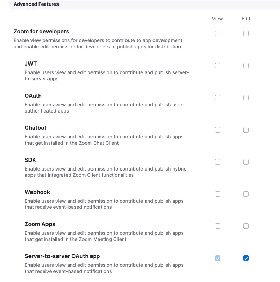
Step A — Create a Server-to-Server OAuth App
Create the app in the Zoom App Marketplace as a Server-to-Server OAuth app. This app type uses the OAuth 2.0 client_credentials grant and is account-scoped (no per-user consent flow), which is required for org-wide ingestion. See Zoom's documentation for more details.
Step B — Assign the Required Scopes
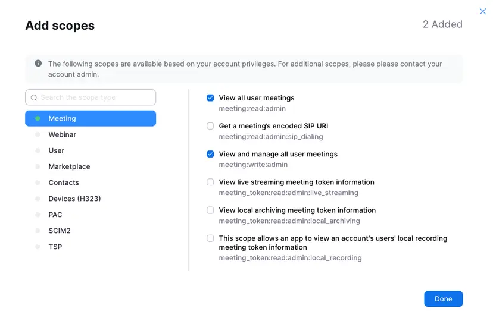
Zoom uses granular scopes — one scope per endpoint family. The table below lists the full set Viven uses. All scopes are read-only.
| Category | Scope | Purpose |
|---|---|---|
| Users | user:read:list_users:admin | List all users in the account (required for org-wide enumeration) |
user:read:user:admin | Get details for a specific user | |
user:read:settings:admin | Read per-user settings (e.g. recording / transcription configuration) | |
| Meetings | meeting:read:list_meetings:admin | List scheduled meetings for users in the account |
meeting:read:meeting:admin | Get details for a specific meeting | |
meeting:read:list_past_instances:admin | List past instances of a recurring meeting (UUIDs) | |
meeting:read:past_meeting:admin | Get details for a past meeting instance by UUID | |
meeting:read:list_past_participants:admin | List participants of a past meeting | |
meeting:read:invitation:admin | Read the meeting invitation text (subject / body) | |
| Cloud Recordings | cloud_recording:read:list_user_recordings:admin | List a user's cloud recordings |
cloud_recording:read:list_account_recordings:admin | List cloud recordings across the entire account | |
cloud_recording:read:recording:admin | Get details for a specific recording | |
cloud_recording:read:list_recording_files:admin | Enumerate individual recording files (MP4, M4A, transcript, chat log, etc.) | |
cloud_recording:read:recording_settings:admin | Read recording-level settings (passcode, sharing, etc.) | |
| Transcripts | (same scope as recording files above) | Transcripts are returned as a recording file of type TRANSCRIPT — no separate scope needed, but transcription must be enabled at the account level |
| Reports | report:read:list_meeting_participants:admin | Authoritative participant report (more reliable than the meeting endpoint for attendance) |
report:read:meeting:admin | Get report-level details for a single meeting | |
| Webhooks (optional) | (no OAuth scope — configured in app settings) | Subscribe to recording.completed, recording.transcript_completed, meeting.ended, etc., so Viven can ingest in near real-time instead of polling |
3. Handoff Checklist
Once your Zoom admin has created and installed the app, share the following with Viven:
| Item | What to provide |
|---|---|
| App credentials | Client ID and Client Secret for the app |
| Data scope confirmation | Which of the following you want ingested: meeting metadata only, or meeting metadata + recordings + transcripts |
| Zoom plan details | Your Zoom plan tier and any known API rate-limit constraints — this helps set expectations for backfill speed |
Quick Summary
Your Zoom admin needs to:
- Create and install a Server-to-Server OAuth app with the scopes listed above
- If recordings or transcripts are in scope, ensure Cloud Recording and transcription are enabled
- Share app credentials, the data scope confirmation, and plan / rate-limit context with Viven
Reach out to your Viven point of contact. We will work with your Zoom admin to validate scopes, credentials, and ingest coverage before rollout.